
How Legal Workflow Automation Works for Legal Teams
TL;DR:
- Legal workflow automation filters up to 80% of work before attorneys need to intervene by intelligently routing and resolving routine requests. It is based on AI-driven intake automation, conditional triggers, native integrations, and human oversight to improve efficiency and maintain accountability. Gradual implementation of automation with clearly defined processes ensures reliable, scalable, and value-generating results for legal teams.
Most attorneys assume workflow automation means faster document drafting. That assumption costs them. Understanding how legal workflow automation works reveals something far more significant: up to 80% of the work reaching your legal team can be filtered, routed, and resolved before any attorney needs to touch it. This article covers the full lifecycle of legal process automation, from AI-driven intake automation at the front door through document generation, matter management integration, and practical implementation. Whether you are a law student building foundational knowledge or a legal professional evaluating tools, you will understand how automation actually works in practice.
Table of Contents
- Key Takeaways
- How Legal Workflow Automation Works: The AI-Driven Front Door
- The Mechanics of Triggers, Routing, and Status Updates
- Document Automation and Matter Management Integration
- Practical Pitfalls to Avoid When Implementing Automation
- Real Benefits Across Law Firm Functions
- My Honest Take After Watching Firms Automate
- See How Jarel Puts These Principles Into Practice
- Frequently Asked Questions
Key Takeaways
| Point | Details |
|---|---|
| Intake automation delivers the greatest return | AI filtering at the front door can eliminate up to 80% of manual matter intake before attorney involvement. |
| Triggers and routing are the engine | Conditional rules that connect events to tasks are what keep automated legal workflows running without a human push. |
| Document and matter systems must integrate | Linking document generation to matter milestones removes handoffs and ensures completed documents are properly archived. |
| Start simple, not flashy | Automating well-defined, structured tasks first creates the foundation for handling more complex processes later. |
| Human oversight remains non-negotiable | Escalation gates, attorney review checkpoints, and audit logs are built into effective legal automation, not added afterward. |
How Legal Workflow Automation Works: The AI-Driven Front Door
The term "Legal Front Door" describes the intake layer of workflow automation, and it is the most underestimated component of the entire system. Think of it as an AI gatekeeper that intercepts every incoming legal request before an attorney sees it, categorizes it, and decides what happens next.
When a business unit submits a contract review request or a compliance question, the AI agent at the front door does not merely log it. It classifies the request type, checks it against predefined rules, determines urgency, and routes it to the relevant queue. For straightforward requests such as standardized NDA reviews or questions about company policy, the system can resolve them entirely without attorney involvement. Anything requiring legal judgment is escalated with full context already attached.
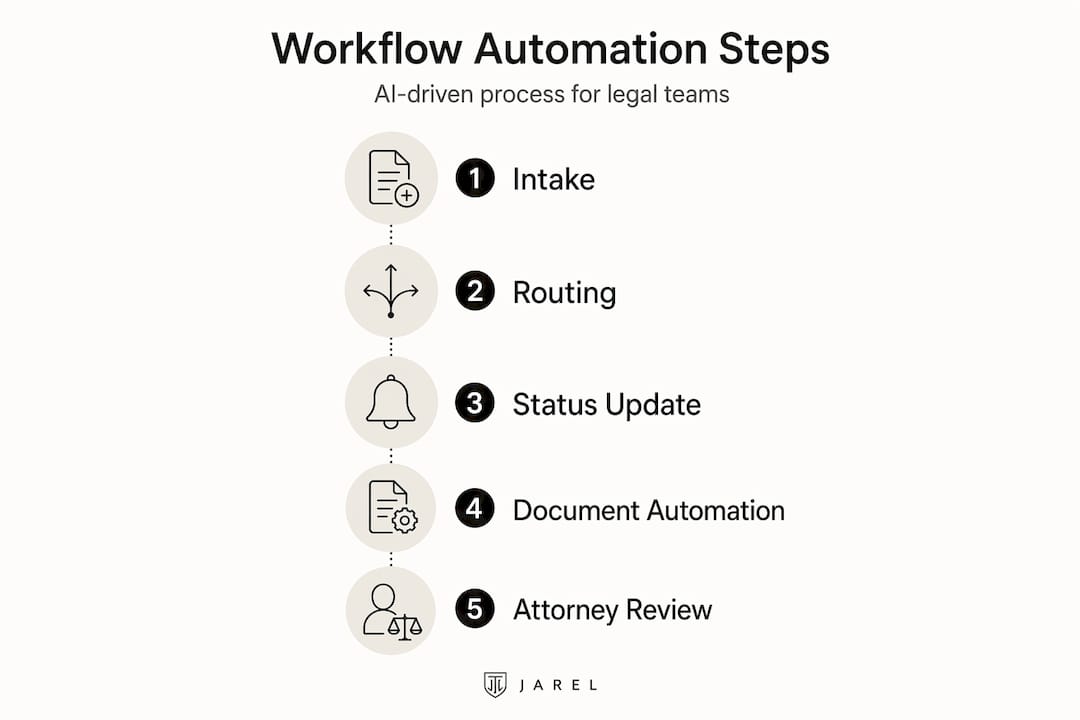
The measurable impact is not trivial. Organizations using AI-driven intake automation and workflow automation report efficiency gains of 50% to 80%, with manual intake volume reduced by up to 80%. That figure changes the entire conversation about where automation creates value.
Pro Tip: Before configuring any intake automation, map every type of request your legal team receives over a 30-day period. Categorize them by complexity and frequency. High-frequency, low-complexity requests are your first automation targets, and they will deliver results within weeks.
Here is what AI-driven intake automation typically handles across common legal functions:
- Contract review triage: Routing standard agreements to pre-approved templates while flagging non-standard clauses for attorney review
- Compliance questions: Resolving frequently asked policy questions using a curated knowledge base without attorney involvement
- Approval workflows: Routing procurement approvals through conditional logic based on contract value and vendor risk tier
- Conflict checks: Automatically checking new matter details against existing client records before assigning it to an attorney
The intake stage is also where intake automation prevents costly reliance on external legal work. When routine work is filtered internally, external attorney hours are reserved for genuinely complex matters. That alone justifies the investment for most mid-sized legal departments.
The Mechanics of Triggers, Routing, and Status Updates
Once a request passes through intake automation, the automation engine takes over. Understanding how legal process automation manages task flow requires understanding three interconnected components: triggers, routing logic, and automatic status updates.
A trigger is any defined event that starts a workflow action. Here is how a typical NDA approval workflow runs in an automated environment:
- A business stakeholder submits an NDA request through the intake form
- The system triggers classification that identifies the agreement type and counterparty
- Conditional routing logic checks the contract value and the counterparty's jurisdiction
- If both fall within pre-approved parameters, the system generates the NDA from the approved template and sends it for e-signature
- If either or both conditions fall outside the parameters, the workflow is escalated to a designated attorney with context attached
- Upon signature, the completed document is automatically archived to the correct matter record, and the requester receives a notification
What makes this powerful is that matter statuses are updated automatically by signals from email threads, Slack messages, and connected workflow systems. Attorneys no longer update status fields manually. The system reads signals and maintains real-time visibility without human input.
| Manual workflow management | Automated workflow management |
|---|---|
| Status updates depend on attorney action | Status updates are triggered automatically by system signals |
| Routing requires coordinator involvement | Conditional logic directs tasks immediately at defined thresholds |
| Bottlenecks arise from email handoffs | Escalation gates trigger on schedule or condition, not on action |
| Matter history is fragmented across inboxes | Full audit trails are centralized and timestamped |
| Deadline tracking requires calendar discipline | Deadline triggers send notifications to all assigned parties |
The critical design principle here is precision. Mapping trigger conditions thoroughly for legal processes prevents digital bottlenecks where documents sit in a queue with no one responsible for moving them forward. A trigger that fires too broadly creates noise. A trigger that fires too narrowly creates gaps. Getting this calibration right is where workflow management in law actually earns its value.
Pro Tip: When configuring trigger conditions, assign a named fallback owner for every escalation path. If a trigger fires and no one is explicitly assigned, the task stalls regardless of how well the rest of your automation is built.
Document Automation and Matter Management Integration
Legal professionals often conflate document automation with document management, and the confusion leads to underbuilt systems. They are separate capabilities that work best when integrated.

Document automation refers to dynamically generating legal documents from templates using conditional logic to insert clauses, populate fields, and adjust structure based on input data. Document management refers to storing, retrieving, classifying, and tracking documents throughout their lifecycle.
Integrating document automation with matter management means that generating a document becomes a milestone event within a matter record, not an isolated task. Here is how it unfolds in practice:
- A matter milestone triggers document generation from the correct template
- Conditional logic in the template inserts jurisdiction-specific clauses based on matter metadata
- The draft is routed to the assigned attorney for review through a defined gate before any external delivery
- After approval, the document is routed for e-signature through an integrated tool such as Adobe Sign
- After execution, the signed document is automatically archived back to the matter record with a timestamp and version history
The attorney review gate is not optional. Effective legal process automation builds human checkpoints into the process, especially for documents with material legal consequences. Trigger-to-document automation requires precisely defined escalation gates to prevent workflow stalls and maintain attorney oversight.
Linking executed documents back to the matter record also pays off later. When a dispute arises or a regulator asks questions, you retrieve a complete, timestamped document history from one place instead of reconstructing it from email chains.
You can see how tools designed to connect document management and compliance treat this integration as a core requirement, not an add-on. When the document lifecycle lives within the matter management system, the entire workflow becomes auditable by design.
Practical Pitfalls to Avoid When Implementing Automation
Automating legal processes is not a one-time configuration exercise. It is an ongoing discipline, and most early failures share the same root cause: teams automate the wrong things first.
Start with well-defined practice profiles and seed documents as the correct foundation. Before any AI tool can automate reliably, it must ingest prior work, understand the firm's standard positions, and operate within a defined playbook. This cold-start interview process is not optional setup. It is what separates automation that works from automation that creates liability.
Common mistakes worth knowing before you build:
- Automating judgment-intensive tasks too early. Litigation, novel regulatory questions, and anything requiring strategic legal advice are not candidates for early automation. Build trust with high-volume, low-variation tasks first.
- Neglecting continuous training. AI feedback and correction mechanisms must run continuously. Automation rules that made sense in Q1 may be outdated by Q3 due to regulatory changes or new matter types.
- Treating intake automation as separate from matter management. Structured intake forms that connect directly to matter creation eliminate the back-and-forth delays that unstructured email intake generates. Intake automation is not a precursor to matter management. It is the first step of it.
- Underestimating trigger-mapping complexity. Most legal workflows involve conditional logic that attorneys understand intuitively but rarely document. Surfacing these decision trees before automation is a prerequisite for accurate routing.
Pro Tip: Run a 90-day pilot on a single, high-volume workflow before scaling. Measure time to completion, error rates, and attorney satisfaction. Use that data to build the business case for broader rollout.
Real Benefits Across Law Firm Functions
The benefits of legal workflow automation are most visible when you look at specific functions rather than abstract efficiency metrics. Here is where legal process automation delivers measurable impact:
- Deadline and calendar management: Automated triggers send reminders and escalations based on matter dates, reducing missed deadlines in high-volume litigation or transactional practices
- Billing and time entry: Workflow automation connected to time-entry systems improves time-entry accuracy and reduces write-offs from unbilled work
- Client communications: Automated status messages keep clients informed without requiring attorney time, improving satisfaction scores
- Trust accounting: Automated reconciliation workflows reduce manual error in IOLTA accounts, a significant compliance risk area
- Due diligence management: Structured workflows for M&A due diligence track document requests, responses, and red flags across large transaction data rooms
Productivity gains in firms adopting workflow management in law are not marginal. Workflow migration between platforms now takes days instead of months, meaning the switching cost of modernizing your workflow infrastructure has fallen substantially. For legal teams still operating on manual coordination, the competitive gap is widening.
My Honest Take After Watching Firms Automate
I have watched firms invest heavily in document assembly tools while leaving their intake process completely untouched. The result is predictable: attorneys still receive routine requests through email, still spend time determining whether something requires their attention, and still log matters manually. The automation exists, but it solves the wrong problem.
In my experience, the highest-value move for any legal team is fixing what happens before the attorney gets involved. Not after. Intake automation that routes intelligently and resolves independently is where workload reduction actually lives. Document generation tools built on that foundation then multiply the impact rather than operating in isolation.
I have also noticed that resistance to automation usually comes from two places: fear that quality will decline and uncertainty about what the attorney's role becomes. Both concerns are legitimate. But the teams I have seen succeed treated automation as a way to concentrate attorney time on work that actually requires legal judgment, not eliminate attorney involvement. That framing changes the entire conversation.
My advice: resist the pressure to automate everything at once. Choose one well-defined workflow, instrument it properly, and let the results make the internal case. The attorneys who see their matter queue shrink by 40% in the first month become your strongest internal advocates.
— Albin
See How Jarel Puts These Principles Into Practice
The workflow concepts covered here are exactly what Jarel is built around. Jarel's AI workspace for legal teams connects intake automation, review, drafting, and compliance workflows in a single source-linked environment, so every automated output can be traced back to a verifiable source. For teams working directly from email, the Jarel Outlook add-in brings AI-driven triage and legal review into the inbox without requiring a context switch. For contract review workflows, Jarel Playbooks lets you configure automated review rules against your firm's standard positions. If you want to see how workflow automation unfolds in a real legal environment, exploring Jarel's product suite is a practical next step.
Frequently Asked Questions
What does legal workflow automation actually do?
Legal workflow automation uses conditional rules and AI to route, prioritize, and complete legal tasks with minimal manual work. It covers everything from intake triage and document generation to deadline tracking and matter status updates.
How does AI-driven intake automation reduce attorneys' workload?
AI at the intake stage classifies incoming requests, resolves routine ones automatically, and escalates complex matters with full context attached. This can reduce manual intake volume by up to 80%.
What is the difference between document automation and document management?
Document automation dynamically generates documents from templates using conditional logic. Document management handles storage, retrieval, and lifecycle tracking. Combining both creates an end-to-end workflow where generation and archiving occur within the same matter record.
Where do most legal workflow automation implementations fail?
Most failures result from automating complex, judgment-intensive tasks too early and skipping the foundational work of defining practice profiles and trigger logic. Start with high-volume, low-variation workflows for better results faster.
Do automated legal workflows still require attorney oversight?
Yes. Effective legal process automation builds attorney review gates for documents with legal consequences, audit logs for every action, and escalation options for anything the system cannot safely handle. Human oversight is a design requirement, not an afterthought.