
In-House Legal Intake Process Guide for 2026
Executive summary:
- An in-house legal intake process systematically receives, reviews, and routes internal requests, ensuring consistency and transparency. Proper design involves standardized forms with conditional logic, written classification criteria, automation tools, and KPIs to measure efficiency; neglecting these elements can lead to missed requests and poor prioritization. Building a mature, automated intake foundation improves team morale, trust, and positions legal departments for strategic growth with AI integration.
An in-house legal intake process is the systematic method your legal team uses to receive, review, classify, and route internal legal requests with consistency and transparency. Unlike a law firm intake process, which focuses on onboarding paying clients, in-house intake manages a constant flow of requests from human resources, finance, procurement, and every other company department. The volume is relentless, request types are diverse, and the consequences of missing something are real. This guide takes you through every stage of building and optimizing a legal intake workflow that actually works under pressure, with practical form design, classification logic, automation tools like Streamline AI, SpotDraft, and Checkbox, and the KPIs that tell you if it's working.
What are the essential stages of an in-house legal intake process?
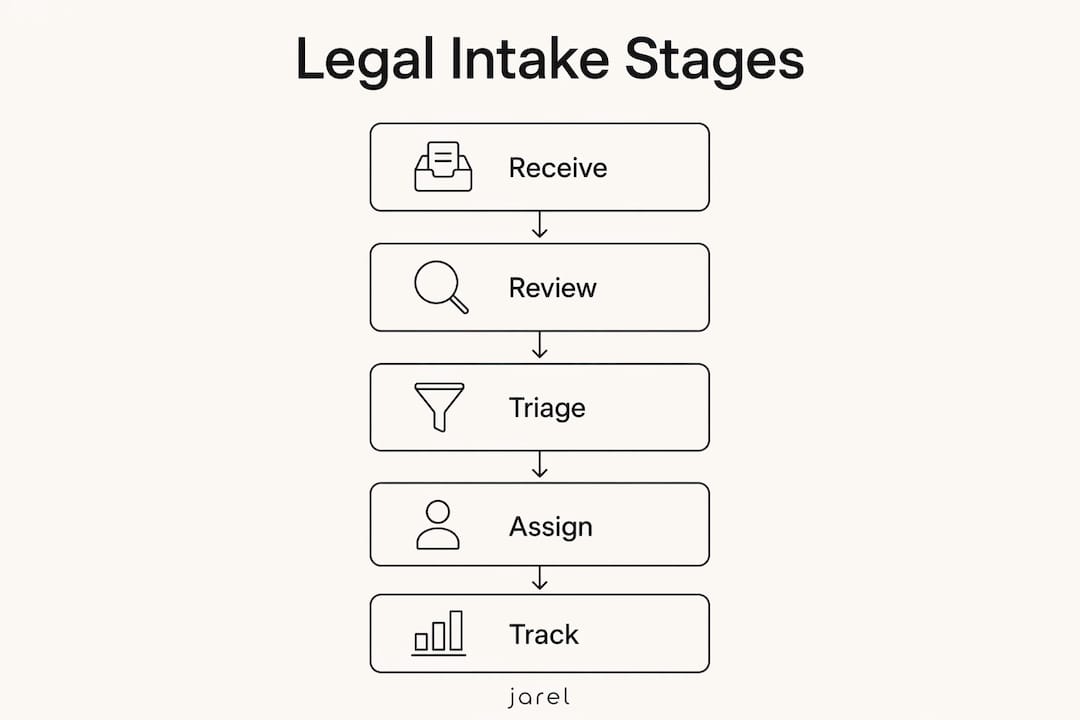
Every effective legal intake workflow follows a defined sequence. Skipping stages creates exactly the problems most legal teams complain about: missed requests, inconsistent prioritization, and attorneys spending time hunting for context instead of doing legal work.
Here are the six main stages your process must include:
- Request submission. Requests arrive via email, Slack, ticketing systems like Jira or ServiceNow, or a dedicated intake portal. The channel matters less than consistency. Every request must enter a single system of record.
- Standardized intake form completion. The requester completes a structured form that captures the information your team needs to act. This is where most processes fall apart if the form is poorly designed.
- Initial review and classification. A legal operations coordinator or designated attorney reviews the submission for completeness, urgency, risk level, and business impact. Incomplete requests are returned immediately rather than sitting in queue.
- Resource assignment. The request is routed to the correct attorney or outside counsel based on subject-matter expertise, current workload, and matter type.
- Legal review and analysis. The assigned attorney works the matter, with all activity logged in the original intake record.
- Stakeholder communication and closure. The requester receives status updates throughout the process and a clear resolution notice at close. Proactive status updates prevent legal departments from becoming a bottleneck and build trust with the business.
Pro tip: Define your classification criteria in writing before launching any intake system. Criteria such as "regulatory deadline within 5 business days" or "potential financial exposure over $50,000" eliminate subjectivity and produce consistent routing decisions every time.
The sequence above applies whether you are a team of three or a department of thirty. What changes with scale is the tooling and formality of each handoff, not the underlying logic.
How to design standardized intake forms and classification workflows
The intake form is the most important artifact in your legal intake workflow. A well-designed form gives your team everything it needs to classify accurately. A poorly designed one generates follow-up emails that defeat the purpose of having a process.

Effective intake forms capture five main data points: requester identity and business unit, a plain-language request summary, relevant deadlines, supporting documentation, and initial risk indicator. That last field, where the requester identifies whether the matter involves regulatory exposure, litigation risk, or a third-party contract, is the one most teams omit and later regret.
Form format matters as much as its content. Conditional logic dynamically adjusts which questions appear based on previous answers, so a procurement request activates contract-specific fields while an HR matter presents employment law questions. Requesters only see what is relevant to them. This reduces abandonment and improves the quality of submissions you receive.
The table below compares static and conditional form designs on the dimensions that matter most to legal operations teams:
| Dimension | Static form | Conditional form |
|---|---|---|
| Requester experience | One long form for all request types | Customized questions based on request category |
| Completion rate | Lower due to irrelevant fields | Higher because the form feels shorter and relevant |
| Data quality | Inconsistent, frequently incomplete | Structured and complete for each matter type |
| Classification speed | Slower, requires follow-up | Faster, data ready for immediate review |
| Maintenance effort | Low initially, grows with complexity | Moderate setup, less ongoing rework |
Pro tip: Build your classification rules as a written decision matrix before configuring any software. Map request type against urgency and risk level, then assign ownership. This document becomes your configuration guide and your training reference.
Classification rules work best when they are objective. Defined classification criteria eliminate bias from routing decisions and produce consistent urgency prioritization regardless of who is reviewing the queue. Pair each rule with a named owner and a response time target, and your classification workflow becomes self-executing.
How can automation tools optimize the in-house legal intake process?
Automation does not replace legal judgment. It eliminates the administrative work surrounding legal judgment so your attorneys can focus on the analysis that actually requires their expertise. Automation relieves attorneys of routing, tracking, and status update tasks while keeping every decision in human hands.
The practical impact is significant. Automating key parts of the intake workflow can improve efficiency by up to 50%. That figure represents hours recovered per week on a mid-sized legal team, time that shifts from inbox management to substantive work.
Modern platforms like Streamline AI and SpotDraft Intake capture requests from Slack, email, and ticketing systems into a single dashboard. Requesters submit through the channel they already use. The legal team sees everything in one place. That centralization alone eliminates the most common source of missed or duplicate requests.
The five automation features your intake system must include by 2026 are:
- Multichannel ingestion. Pull submissions from email, Slack, Microsoft Teams, and web forms into a queue automatically.
- Rule-based routing. Assign matters to the correct attorney or team based on request type, business unit, and urgency without manual intervention.
- Real-time status notifications. Send requesters automatic updates at every stage transition, cutting ad hoc "where's my request?" queries.
- Contract Lifecycle Management integration. Connect intake directly to CLM platforms so contract requests move from submission to drafting without re-entry.
- Analytics and reporting. Track volume by type, cycle time, and routing accuracy so legal operations can identify bottlenecks and make the case for additional resources.
For teams already using legal workflow automation, the next step is connecting intake data to downstream review tools. When a contract request clears classification, it should land directly in the review environment with all intake context attached, not in someone's inbox as a forwarded email.
Common challenges in legal intake and how to troubleshoot them
Most legal intake problems trace back to one of five root causes. Recognizing which one you are facing determines the solution.
Fragmented submission channels produce duplicate requests and missed matters. The solution is a single submission point, reinforced through communication and, where possible, automatically redirecting email aliases to the intake system.
Business user resistance is the most underestimated obstacle. People submit requests the way they always have because the new process feels like extra work. The solution is not more training. It is making the intake form faster and easier than sending an email. Conditional logic, pre-filled fields, and a response time commitment tied to proper submission change the incentive.
Form fatigue causes incomplete submissions. Long static forms make requesters skip fields or abandon the form entirely. Conditional logic is the structural solution. Keeping required fields to the minimum necessary for classification is the design principle.
Poor prioritization overloads senior attorneys with routine requests while urgent matters wait. This is a classification design problem, not a volume problem. Review your decision matrix and add explicit escalation rules for matters that meet defined risk thresholds.
Inadequate data makes it impossible to report on legal team performance or justify staffing. This is an upstream form design problem. If your intake form does not capture business unit, request type, and deadline, your reports will never tell you anything useful.
Pro tip: Start your intake process with the two or three highest-volume request types your team handles. Get those workflows right before expanding coverage. A focused launch builds user trust and gives you clean data to learn from before scaling.
Monitor time to first review and routing accuracy from day one. These two metrics tell you if your classification is working before enough cycle time data accumulates to be meaningful.
What metrics and KPIs should you track for legal intake?
Intake data is a strategic asset that enables legal operations to measure cycle times, demonstrate team value, and identify where the process breaks down. Without it, the legal department remains a cost center that cannot explain its own workload.
The table below defines the metrics that matter most, with target benchmarks for a mature intake operation:
| Metric | Definition | Target benchmark |
|---|---|---|
| Request volume by type | Count of submissions by matter category per period | Tracked monthly; baseline in first 90 days |
| Time to first review | Hours from submission to initial classification decision | Less than 4 business hours for standard requests |
| Routing accuracy | Percentage of requests assigned correctly on first routing | Above 90% |
| Cycle time | Total days from submission to matter close | Varies by type; set targets by category |
| Requester satisfaction | Post-resolution requester survey score | Above 4 out of 5 |
Report these metrics monthly to your legal leadership and quarterly to the business. Monthly reports catch emerging bottlenecks before they become backlogs. Quarterly reports give you the trend data to make resource planning arguments with evidence instead of anecdote. Tools like in-house legal ops dashboards can visualize this data in formats that resonate with non-legal stakeholders.
Key takeaways
A structured in-house legal intake process requires standardized forms with conditional logic, defined classification criteria, automation for routing and tracking, and consistent KPI measurement to deliver measurable efficiency gains.
| Point | Details |
|---|---|
| Conditional forms outperform static ones | Dynamic questions reduce abandonment and produce complete submissions ready for classification. |
| Automation recovers up to 50% of administrative time | Routing, tracking, and status updates should be handled by the system, not by attorneys. |
| Classification criteria must be written, not assumed | Objective rules eliminate bias and produce consistent prioritization across all reviewers. |
| Start narrow, then expand | Launch with high-volume request types first to build user trust and clean baseline data. |
| KPIs make legal value visible | Time to first review and routing accuracy are the two metrics to track from day one. |
Why intake maturity is the foundation of a strategic legal team
I have worked with legal teams at both ends of the intake maturity spectrum, and the difference in team morale alone is striking. Teams without a defined intake process spend a disproportionate amount of time managing the chaos of their own inbox. Attorneys who joined to do legal work end up as project coordinators for requests they cannot even classify properly because the information they need was never captured.
The shift to a structured intake process changes the dynamic between legal departments and the business. When requesters know what to submit, how to submit it, and when to expect a response, they stop treating the legal department as a black box. That trust is hard to quantify but easy to feel.
The direction of travel is clear. AI-driven classification, autonomous resolution for routine requests, and deeper integration between intake and contract review tools are already in production at leading legal operations teams. The teams that will benefit most are not the ones with the largest budgets. They are the ones that got the intake fundamentals right first.
My caveat is this: do not automate a broken process. Map your current workflow, identify where requests get lost or delayed, and fix the logic before configuring the tools. Automation amplifies what you already have. If what you have is inconsistent, automation makes the inconsistency faster.
— Albin
How Jarel supports your legal intake and review workflows
Jarel is built for legal teams that need AI-assisted work to be transparent, traceable, and connected to source materials. Once a request clears intake and moves to review, Jarel's Playbooks apply your team's own review rules to contracts automatically, with every result linked to the clause or statute that triggered it. The Outlook Add-In brings that capability directly into the inbox where many requests still arrive, so attorneys can act on submissions without switching tools. For teams building automated routing and review sequences, Jarel's Workflows connect intake, review, and approval steps in a single, auditable environment. No black-box outputs. No disconnected tools. Just legal AI that keeps humans in control.
Frequently asked questions
What is an in-house legal intake process?
An in-house legal intake process is the structured system a corporate legal team uses to receive, classify, assign, and track internal legal requests from across the company. It differs from a law firm intake process because it handles a constant flow of requests from internal departments rather than onboarding external clients.
How does conditional logic improve intake form design?
Conditional logic shows only the questions relevant to a specific request type, which reduces form length for the requester and improves the integrity of captured data. Forms that use conditional logic produce higher completion rates and fewer follow-up queries from the legal team.
What types of requests make up the largest share of in-house intake volume?
Regulatory compliance questions and advice requests typically make up the largest share of in-house intake volume, not contract reviews. This means intake forms and classification workflows must be designed for a broader range of matter types than most teams initially anticipate.
Which KPIs should I track first when launching a new intake process?
Start with time to first review and routing accuracy. These two metrics reveal whether your classification logic is working before you have enough cycle time data to draw conclusions about overall process performance.
Does automation replace legal judgment in the intake process?
No. Automation handles administrative tasks such as routing, tracking, and status notifications. Legal judgment, including classification decisions on complex or ambiguous matters, remains the responsibility of qualified attorneys.